
|
|
3 | Button area |


|
|---|
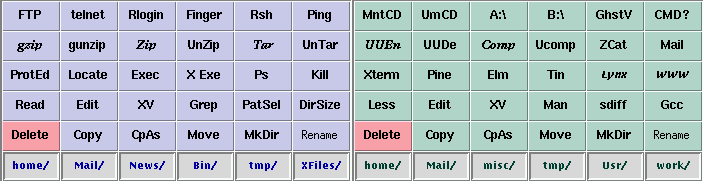
The Actionbuttons are located in the top of the window. They are vertically divided in two so that each set affects its own side.
There is a maximum of eight rows with maximum of six buttons in a row on each side. This way the maximum amount of user configurable buttons is 96. You can edit the amount and order of the rows from the Buttons-menu. The toggling of visibility is done as follows:
When a row is activated it will become the topmost row. When a row becomes hidden, any row above it will drop by one step.
You can define your own startup configuration in the main resource file with the Resource Editor. This includes the number of columns (1-6) and the spacing of the buttons. Also in the main resource file you can define button sets that can be turned on and off with a single command from the menu or by a function key.
If there are no files selected and you press a button with an internal procedure, the result is a warning. With external procedures the command is executed without file arguments making X-Files also a nice front-end for launching different applications.
Example:
You have in the left side (e.g. a download directory) selected all the movie files (*.mpg) with the [PatternSel] procedure. You change the directory in the right side to that where you keep your movie files, and click your move button in the left side. The files are moved to the right side, where you can select everything with "SelectAll"-button and then click your movie button on the right side to view all the movies.
You can, however, use also the right and the middle mousebutton with the ActionButtons. If you click the right mousebutton, the operation affects the selected files on the other side and if you click the middle mousebutton, the operation affects selected files on both sides. For example, a quick way to swap the contents of two directories is to select all files in both directories and then click [Move]-button with the middle mousebutton.
|
|